A New Satellite is in the Air

July 1st, 2009 by Josh

SIRIUS FM5 Launches on June 30th 2009

What does this mean for you? As a SIRIUSXM Subscriber you can now look forward to a new high powered geostationary satellite that will enhance the SIRIUSXM service. This satellite adds of the already stellar lineup of satellites providing all of us with non-stop entertainment.

Launched from the Baikonur Cosmodrome in Kazakhstan, this satellite is major investment into the satellite radio industry designed to supplement the exhisting satellites and provided an enhanced service to all of us SIRIUSXM Subscribers.

According to Orbitcast.com, “The Sirius FM-5 Satellite - based on the Space Systems/Loral 1300 platform - is said to be one of the most powerful satellites ever constructed, and will be the first geostationary satellite in Sirius’ roster of satellites.”

The new satellite, which produced nearly 2.5 million pounds of thrust during its launch Yesterday at 3:10pm ET, has the ability to help fill in the outline of SIRIUSXM’s current fleet of satellites.

Mission Statement:

“SIRIUS XM Radio is America’s satellite radio company delivering
commercial-free music channels, premier sports, news, talk,
entertainment, traffic and weather to millions of subscribers.
The SIRIUS XM FM-5 satellite will supplement the existing fleet
of SIRIUS satellites with a high-power geostationary satellite
that enhances the listening experience. It will ensure SIRIUS
XM’s array of audio and data services are received robustly by
cars and mobile devices, improve the signal delivery to homes,
and bolster the continuity of our service for years to come.
SIRIUS XM is installed in vehicles of every major automaker
and available for sale at retail locations nationwide. SIRIUS
XM offers SIRIUS Backseat TV, the first live in-vehicle rear seat
entertainment, featuring Nickelodeon, Disney Channel and
Cartoon Network, as well as XM NavTraffic® service for GPS
navigation systems, delivering real-time traffic information to
markets across North America.”
Specifications of the Proton launch vehicle:

Total Height
58.2 m (191 ft)
Gross Liftoff
Weight

705,000 kg
(1,554,000 lb)
Propellant
UDMH and N2O4

from ILSLaunch.com

This satellite marks the 4th SIRIUS Satellite that has been launched on a Proton launch vehicle.

Share this Page with your Friends:
  • Digg
  • del.icio.us
  • StumbleUpon
  • Technorati

6 Block Radius of TSS-Radio

June 29th, 2009 by Josh

TSS-Radio is located in a fascinating area of Chicago and we wanted to give you an idea of the contrasting areas that surround us.

In honor of our friends who started www.radius6.tv, a TV Show geared towards travel destinations within 6 hours drive of Chicago we wanted to do the same thing in a roughly 6 Block Radius of TSS-Radio. We are on the border of Wicker Park/Bucktown as well as Lincoln Park in Chicago. So here is our neighborhood from Industrial to Retail to a variety of Homes.

-Taylor

Share this Page with your Friends:
  • Digg
  • del.icio.us
  • StumbleUpon
  • Technorati

Current Weather at TSS-Radio

June 19th, 2009 by Josh

Look at some pics of the incoming storm:

More to come….maybe……..

Share this Page with your Friends:
  • Digg
  • del.icio.us
  • StumbleUpon
  • Technorati

TSS-Radio in StreetWise

June 18th, 2009 by Josh

TSS-Radio is advertising this week in Streetwise Magazine. It’s a local magazine that supports Homeless people who instead of simply asking for money have a product to sell on the streets. The Streetwise Vendors buy the issues and then sell them back for a profit to the public. Some have really been able to change their lives with this program as seen on “Streetwise The Movie” .

This week TSS has advertised under the Miri Ben-Ari article. Miri is known as the Hip-hop Violinist. If you can find a copy in Chicago from a vendor than checkout our ad on page 12. Here are some pictures of the article.

Streetwise online can be found at StreetWise.

Taylor

Here is a link to the StreetWise Article: StreetWise Article

Share this Page with your Friends:
  • Digg
  • del.icio.us
  • StumbleUpon
  • Technorati

SIRIUS/Mp3 Audio Integration

June 15th, 2009 by Josh

How to integrate SIRIUS or an Mp3 Player Audio in your Car and Home

Installing a SIRIUS Satellite Radio is very close to installing an Mp3 in your car. Both types of media need basically the same thing. Below is a simple breakdown of how to integrate these into your car and home.

SIRIUS/Mp3 Integration in a Vehicle:

Note:You must install the SIRIUS Car Kit-for Satellite Radio, this always the first step.

In a car both units need an audio connection. This can be done several different ways based upon the desired quality. For the highest quality, I would suggest an Aux-Input. These units install to the back of the car stereo headunit and have RCA input cables that run up to the source, whether a SIRIUS Radio or Mp3 device. Most of the these units use the simple headphone jack 1/8” however for specfic Mp3 devices (ie. iPod) have specific connectors that allow for more than just an audio connection. See Here for iPod Integration

SIRIUS/Mp3 vehicle integration devices can be found HERE

Also another great devices for iPods and SIRIUS is the Audio Cassette Adapter, this device is simply as can be. Plug the cassette into your vehicle’s cassette player and extend the cable to your SIRIUS Dock or Mp3 and Done! Check them out HERE

SIRIUS/Mp3 Integration in the Home:

SIRIUS Satellite Radio and Mp3 devices can use many of the same equipment to be installed in the home. If you have a home stereo receiver, simply connecting your SIRIUS Home dock to the RCA Audio Input in the Home Stereo would give you a great quality sound. If you do own a newer SIRIUS Satellite Radio that utilizes the Universal Style Dock or the Sirius Stiletto Series, and if you own an iPod than we have a great product to be able to dock both of those and play/charge them:

Sirius Soloist Universal Sound System

This sound system also has an AUX-Input for use with standard Mp3 players.

There is a seemingly endless count of devices and equipment to Integrate SIRIUS Radios and Mp3 Players in vehicles and the home. If you have any questions on how to hook up your vehicle or connect your home to these devices please feel free to give me a call up 773-772-4340 ask for Josh or shoot me an email: Josh@tss-radio.com . Thanks!

Share this Page with your Friends:
  • Digg
  • del.icio.us
  • StumbleUpon
  • Technorati

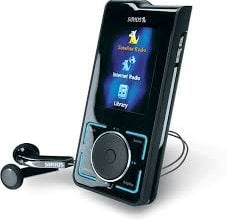
SIRIUS Stiletto 2 and XM XMp3

June 9th, 2009 by Josh

What options does the SIRIUS Stiletto 2 have? What options does the XM XMp3 have?

In a Head to Head breakdown of features here is what I found:

Radio Sirius Stiletto 2
XM XMp3
Satellite Service Sirius Satellite Radio XM Satellite Radio
Screen Size 2 1/4” 2 3/4”
WiFi Compatible

Yes

No

Internal Storage Space 2gb 2gb
Memory Card Compatible up to 16gb on a MicroSD Card up to 16gb on a MicroSD Card
Weight 4.3oz 2.5oz
Music Files Supported Mp3/WMA Mp3/WMA
Simultaneous Channel Recording Only 1 Satellite Channel at a time Up to 5 Satellite Channels at a time
Home or Car Kit Included No Home Kit Included

So who wins in the battle? You do. Both receivers are quality products that both have something different to bring to the table. I couldn’t pick one or the other to say, “it’s a better receiver”. Each receiver is designed to carry different attributes, so don’t think of them as rivals, but more as teammates.

Share this Page with your Friends:
  • Digg
  • del.icio.us
  • StumbleUpon
  • Technorati

How to find a quality car audio installer

June 4th, 2009 by Josh

Have you ever needed a car audio installer and did know where to turn? Looking for more than the Big Box cookie cutter installers?

Finding a quality installer is easier than you think if you know what to look for, and I can help you find a person you trust to handle your vehicle.

Step #1- Interview the installer/shop before you commit. Even before you look for local reviews of a shop go there, get a vibe from the place. Most shops will not allow you to enter the installation floor( for insurance reason) however if they cannot take the time to get to know you and your situation then move on.  Good installers build a relationship with each and every person that walks in the door. You might not be able to talk to the shop owner, but don’t get discouraged if you speak to the standard installer-they can tell you a lot about how the shop operates and they will  be the ones making the install happen.

Get a vibe for the shop-look around for displays or more importantly if they show off awards or certifications. If the shop you are in does not display past or future work they are doing, there might be a reason. Does the shop look clean? Safe? Do you see employees goofing off?

Step#2-Before committing to the shop, check for reviews in your local area. The Internet has given many people the ability to review everything these days, install shops are frequently reviewed because they are in the service industry.  Yelp.com and Yahoo Local Business are great sources for reviews.

Step#3-try local independent stereo install shops, don’t get blinded by the Big Box stores. Local shops survive on Customer service, because if they gave bad service they would cease to exist, whereas if Big Box stores gave bad service they would just sell more MP3 players to make up for it.  Local shops need to have good customer service to prosper and continue to stay in business, give them a chance. Local shops also build better relationships with you, in case there is any mistakes they are more likely to resolve it to your satisfaction. Local shops most of the time have access to the same resources as larger chain store and they also can perform various installs that chain stores will not do(ie. custom boxes, lock picking a Nav Screen to play DVD’s, boats etc.)

I only go to local install shops when I need something done. They can order just about anything you need and if not they can make it. If you need help selecting a car audio installation shop in your area feel free to shoot me an email Josh@tss-radio.com and I can help you out. Thanks!

Share this Page with your Friends:
  • Digg
  • del.icio.us
  • StumbleUpon
  • Technorati

Technical Update on a Few Products

May 27th, 2009 by Josh

I want to take a moment here on the TSS-Radio Blog and post a few Technical Updates for some products we sell. As always not only do we sell Satellite Radio Products-we are here for you Before, During and After the sale is made, to ensure a quality experience with TSS-Radio.com and the products we sell.

Technical Update #1- The GM2L is a product we offer to convert select GM branded vehicles 2006-2009.  The update on this unit includes a .pdf Installer’s Guide to help ensure a successful installation. The sheet is more of a quick guide to installation, but it does come in handy for the Do-It-Yourselfer. The quick guide can be found/printed here:http://www.tss-radio.com/images/GM2L_Instructions.pdf

Technical Update #2- iSimple kits are designed to allow many vehicles the ability to receive In-Dash SIRIUS. The Technical Update includes a key step the the instruction manuals have seemed to not include. The .pdf is a quick reference guide for installers, but a must for self installers. It will take you step by step on each of the required processes. The installer guide can be found here: http://www.tss-radio.com/images/iSimple_instructions.pdf

If you need assistance in any installation feel free to shoot me an email: Josh@tss-radio.com or give me a call up 773-772-4340 ask for Josh. Thanks for Reading!

Share this Page with your Friends:
  • Digg
  • del.icio.us
  • StumbleUpon
  • Technorati

New Whole Foods Market in Chicago!

May 20th, 2009 by Josh

img_4386img_4385

Just thought I would show everyone a new store that literally just sprouted up here in TSS-Radio’s neighborhood.  We always had a Whole Foods on North Ave , within walking distance of TSS-Radio, but now we get to bask in the glory of the New-Huge store they put up. I took a trip over there for lunch today and all I got was a can of all natural juice drink, I would have gotten food, if I had been able to get to it. There was a ton of people there. Wall to Wall people lined up during the lunch hour to partake in the Grand Opening of the new Whole Foods Market.  I plan on taking more photos of the inside to show everyone how cool it looks and more importantly how the food tastes.

I’ll keep you posted on the development of this story!

Whole Foods UPDATE! 

Hi, this is Tish. I was able to make it over to the new Whole Foods Market to check it out and take some photos! First of all, Josh isn’t exaggerating about this place being huge! Through a quick Google, we found out that this is the 3rd largest Whole Foods in the world, coming in at a massive 75,000 sq. ft.! There are 3 levels, an attached parking garage, a full food court, a wine and cheese bar, a bar with micro brews and local beers on tap, fresh nut butter grinders, a trail mix bar, plus all the other departments of Whole Foods bigger and better than ever. It’s like a grocery store mall! This is gonna make lunch time at TSS Radio so much more exciting! 

Anyways, here are some photos I was able to take through the mass of customers and  employees. 

View of the produce section, flower area, and bar from the escalators coming from the parking garage.

View of the produce section, flower area, and bar coming in from the parking garage.

In the produce section

In the produce section. Notice the "street" signs! This place is gigantic.

Another shot of the wine area. Who says Whole Foods is too expensive? Bottles of wine for $6.99

Another shot of the wine area. Who says Whole Foods is too expensive? Bottles of wine for $6.99

Prepared food area. They aren't pictured, but there's a sub shop, pizza stand, taqueria, diner, smokehouse, and noodle shop in the food court!

Prepared food area. They aren't pictured, but the street signs point you to the taqueria, diner, sub shop, and other food court offerings. You can also see the 2nd floor seating area.

It's hard to see, but this is the wine and cheese bar. There's seating behind the service area.

It's hard to see, but this is the wine and cheese bar. There's seating behind the service area.

Looking down on the bar

Looking down on the bar


Live plants and more produce out front

Live plants and more produce out front


Share this Page with your Friends:
  • Digg
  • del.icio.us
  • StumbleUpon
  • Technorati

Need to Convert XM to SIRIUS? New GM-Honda-Toyota and Much More!

May 15th, 2009 by Josh

If you are looking to convert your vehicle from XM to SIRIUS, here is a guide based on make, model and year. Please feel free comment if you have any questions or concerns or shoot me an EMAIL

NEW

GM Sirius Connect SIRGM2L

This is a long awaited solution for Newer “Lan” Based vehicles! The compatibility includes:

Buick:

  • Lesabre 2006
  • Lucerne 2007-2009

Cadillac:

CTS Not Compatible

  • DTS 2006-2009
  • Escalade 2007-2009
  • Escalade ESV 2007-2009
  • Escalade EXT 2007-2009
  • SRX 2007

Chevrolet:

  • Avalanche 2007-2009
  • Equinox 2007-2009
  • Impala 2006-2009
  • Monte Carlo 2006-2007
  • Silverado (New Body) 2007-2009
  • Suburban 2007-2009
  • Tahoe 2007-2009

GMC:

  • Acadia 2007-2009
  • Sierra 2007-2009
  • Yukon 2007-2009
  • Yukon XL 2007-2009

Pontiac:

  • Torrent 2007-2009
  • Vibe 2009
  • G8 2009 Only

Saturn:

  • Outlook 2007-2008
  • Vue 2008-2009

Suzuki:

  • XL-7 2007-2009

gm1-SIR-GM1 SIRIUS Connect: This will convert select 2003-UP  “Class II” GM made vehicle from the factory XM.  Chevrolet-Buick-GMC-Cadillac-Hummer-Isuzu-Oldsmobile-Pontiac-Saab-Saturn.

BE SURE TO CHECK THE COMPATIBILITY

honda sirius -HONDA and ACURA SIRIUS Connect Package:This is the conversion kit for select 2003-UP Honda and Acura made vehicles. SIRIUS HONDA and ACURA

NOTE:This Adapter does NOT work with ANY Honda or Acura vehicles with the ‘Technology Package’

BE SURE TO CHECK THE COMPATIBILITY

toyota sirius-TOYOTA LEXUS and SCION SIRIUS Connect Package:This is the connect package for select 2004+UP Toyota, Lexus and Scion vehicles. SIRIUS TOYOTA-LEXUS-SCION

BE SURE TO CHECK THE COMPATIBILITY

We have a LARGE SELECTION of In Dash options including most brands of vehicles- Check here to see if you can enjoy In Dash SIRIUS Satellite Radio!

Be sure to read all the notes and compatibility charts to avoid any confusion. As always Give TSS-Radio a call and we can discuss your options!

TSS-Radio:773-772-4340

Share this Page with your Friends:
  • Digg
  • del.icio.us
  • StumbleUpon
  • Technorati